





Prevent your Facebook account from being cloned
This was resurrected by facebook “memories”. This post is about guarding your privacy and preventing people from cloning your account. There are two important steps you can take at the bottom of this post.
You know how you get a friend request from someone who is already your friend? This happens when your friend (or maybe you!) have your account settings open so that anyone who wants to can see who all of your friends are. They take the list of your friends and your publicly available pictures and create another account and start making friend requests from that account. (side note: you should go to your profile and turn these things off)
When the victim starts getting messages from their friends saying “Hey, i got a friend request from you but i’m already your friend”, that’s the part when the victim of the cloning sends out a message that says “hey, I’ve been ‘hacked’, don’t accept any friend requests from me bla bla bla”. You have certainly seen the messages.
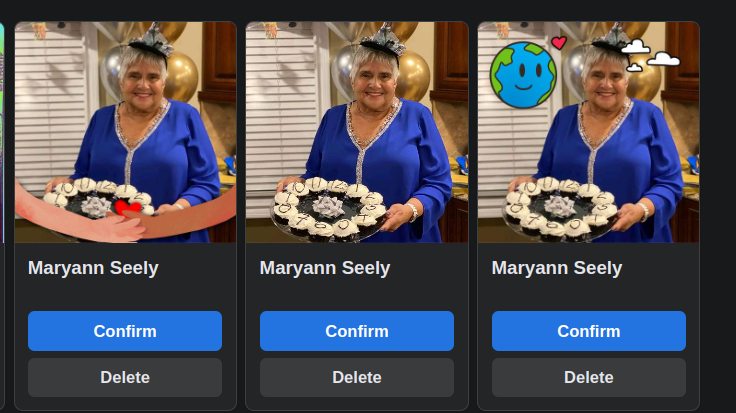
This happened to my Aunt Maryann a couple years ago not just once, but three times. I haven’t checked recently, but at one point there were two cloned accounts based on her actual account. I tried to tell her about it at the time but she didn’t think it was a very big deal. I don’t know if she’s done anything about it. As a practical matter, it’s made it difficult for me to send a message to her here on Facebook because I am not always sure which one is her actual profile.
This has real consequences: I am pretty sure that my brother and sister are friended to the wrong one.
What I found interesting was that the cloners also have this problem, so they make minor changes to the profile picture. This pic shows all three of her accounts, and they had added a little bit of “flair” to the profile pictures.
I just checked mine and i saw that there is a new one “who can see your followers” and it was set to “public”. You probably want to make this “Friends” or “Just me” This is at https://www.facebook.com/settings/?tab=followers_and_public_content
The location for where to lock down your friends list seems to have moved since the last time I checked, as well. There is a setting called “Who can see your friends list” and you should also set this to “friends” only or “just me” https://www.facebook.com/settings/?tab=how_people_find_and_contact_you
© 2026 rcanzlovar.com | About | Contact | Privacy Policy |